

Looking for Best Laptop Under ₹50,000 in India has become much easier in recent years. Many brands now offer powerful processors, SSD storage, and good displays even in the budget segment. Because of this, users can easily find laptops suitable for study, office work, online classes, and even light gaming without spending too much money.
However, choosing the right laptop can still be confusing because there are many options available in the market. To help you make the right decision, we have compared three of the best laptops under ₹50,000 in India based on performance, features, and value for money.
In this guide, we will look at the ASUS Vivobook Go 15, Lenovo IdeaPad 3, and Acer Aspire 3.
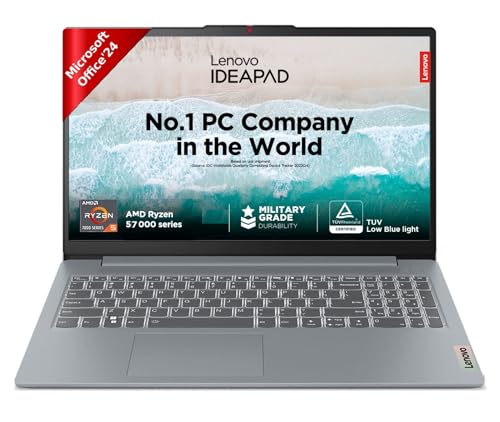
| Feature | ASUS Vivobook Go 15 | Lenovo IdeaPad 3 | Acer Aspire 3 |
|---|---|---|---|
| Processor | AMD Ryzen 5 | AMD Ryzen 5 | Intel Core i5 |
| RAM | 8 GB | 16 GB | 16 GB |
| Storage | 512 GB SSD | 512 GB SSD | 512 GB SSD |
| Display | 15.6″ Full HD | 15.6″ Full HD | 14″ Full HD |
| Graphics | Integrated AMD Radeon | Integrated AMD Radeon | Intel |
| Battery | Around 6-8 hours | Around 6-8 hours | Around 5-7 hours |
| Best Use | Students | Multitasking | Office Work |
All three laptops offer fast SSD storage and modern processors, which makes them much faster than older budget laptops.
ASUS Vivobook Go 15 – Best Laptop for Students
The ASUS Vivobook Go 15 is a great choice for students who need a laptop for daily tasks such as studying, attending online classes, browsing the internet, and working on assignments.
This laptop comes with a Ryzen 5 processor and SSD storage, which ensures smooth performance while using multiple applications.
Key Features
- AMD Ryzen 5 7520U Processor 2.8GHz
- 15.6″ FHD Display, 250 nits Brightness
- LPDDR5 8 GB RAM
- Windows 11 Home
- Integrated AMD Radeon Graphics
Why Students Should Choose It
Students often need a laptop for online classes, research, note-taking, and presentations, and the Vivobook Go 15 handles these tasks easily.
Lenovo IdeaPad 3 – Best Laptop for Multitasking
The Lenovo IdeaPad 3 is a reliable laptop known for its balanced performance and durable build quality. It is powered by a Ryzen processor that performs well in multitasking situations.
If you often run multiple applications like a browser, office software, and video calls at the same time, this laptop performs smoothly.
Key Features
- AMD Ryzen 5 processor
- 16 GB RAM
- 512 SSD Storage
- Full HD anti-glare display
- Comfortable keyboard
Performance
This laptop works well for tasks like:
- Coding
- Office work
- Online meetings
- Content consumption
- Processor: AMD Ryzen 5 7520U | Speed: 2.8GHz (Base) – 4.3GHz (Max) | 4 Cores | 8 Threads | 4MB Cache
- Display: 15.6″ FHD (1920×1080) | 250Nits Brightness | Anti Glare |TUV Low Blue Light Certified.
- Memory and Storage: 16GB Soldered LPDDR5-5500 | 512GB SSD M.2 2242 PCIe
Acer Aspire 3 – Best LaptopBest Laptop for Office Work
The Acer Aspire 3 is another strong option in the budget category, especially for professionals who need a laptop for productivity tasks.
It comes with an Intel Core i5 processor which offers good responsiveness for daily office work.
Key Features
- Intel Core i5 – 1235U processor
- DDR4 16 GB RAM
- 14″ Display with IPS
- Ultra-slim design
Best for
This laptop is ideal for:
- Office work
- Business use
- Microsoft Office tasks
- Online meetings and presentations
Best Laptop for Students
Among the three options, the ASUS Vivobook Go 15 is the best choice for students.
Reasons include:
- Portable design
- Good battery life
- Smooth performance for study tasks
- Fast SSD storage
It is perfect for college work, assignments, and everyday use.
Best Laptop for Gaming
Gaming laptops usually cost more than ₹50,000, but if you want to play light games, the Lenovo IdeaPad 3 is the better choice.
It can handle games such as:
- Valorant
- GTA V (low settings)
- Minecraft
- CS:GO
However, for serious gaming, a laptop with a dedicated graphics card is recommended.
Best Laptop for Office Work
For professionals and office users, the Acer Aspire 3 is the best option.
It offers:
- Reliable Intel processor
- Smooth performance for productivity
- Good compatibility with office software
This laptop works perfectly for Excel, PowerPoint, video calls, and daily office tasks.
Tips for Choosing a Laptop Under ₹50,000
Before buying a laptop, keep these points in mind.
Processor
Choose laptops with at least:
- Intel Core i5
- AMD Ryzen 5
These processors provide good performance for everyday work.
RAM
8GB RAM is the minimum recommended for smooth multitasking.
Storage
Always choose laptops with SSD storage, preferably 512GB SSD, because SSDs are much faster than traditional hard drives.
Display
A Full HD display provides better clarity and is ideal for watching videos, working on documents, and browsing the web.
Top 10 laptops in india
Here are some more laptop for you